

Typography · Code
The switch in the page’s head picks where the text styles come from:
- Design: the text styles synced from Figma. Everything else on this page describes this side.
- Code: the text styles your component library’s repository uploaded with
grails-cli sync. The number in the head counts the styles of the repository on screen.
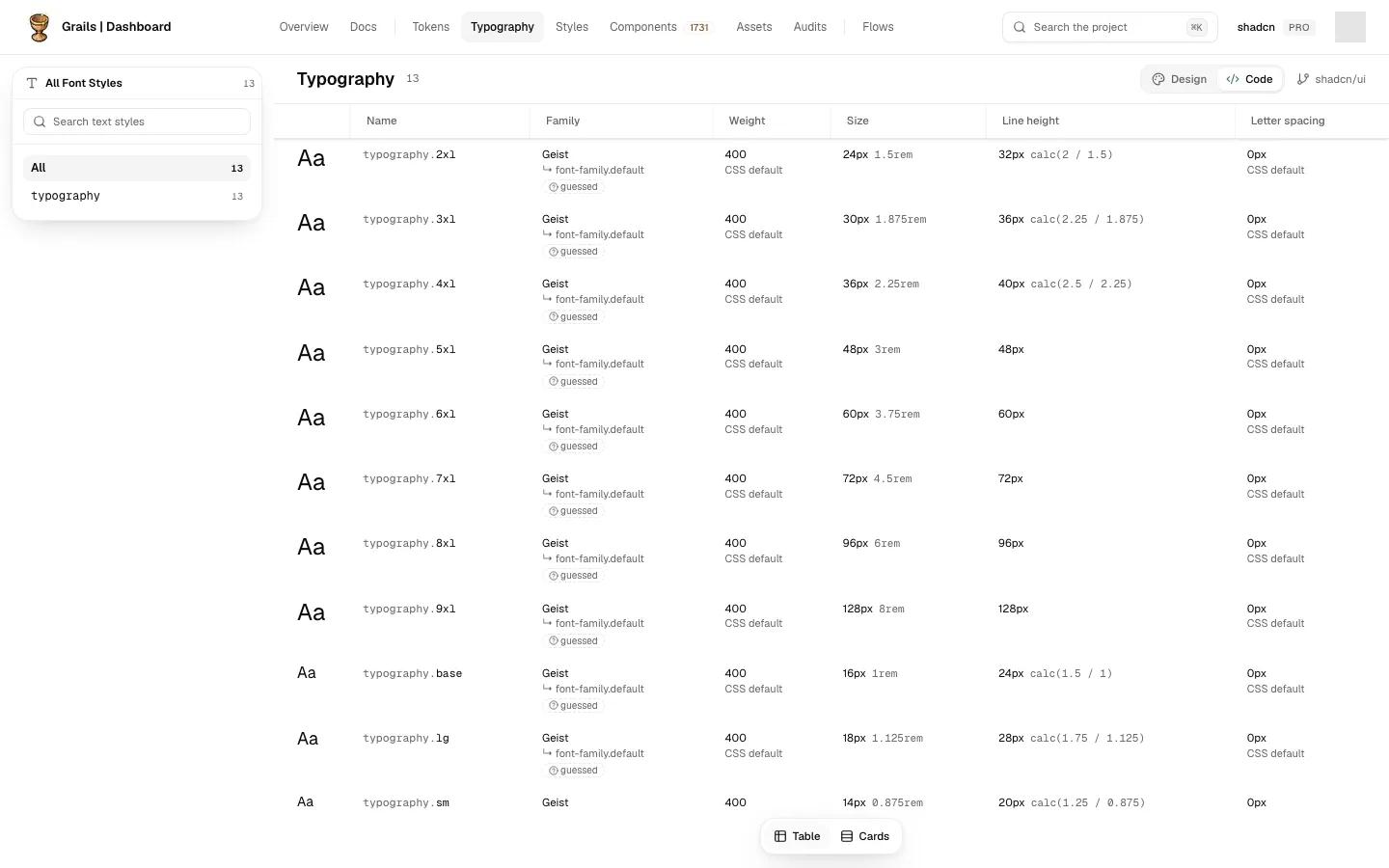
The Code side has the same Table and Cards buttons in the bar at the bottom, and opens as a table. The table has one row per style: a sample “Aa”, the style’s name (its path in the code, such as typography.sm), and its Family, Weight, Size, Line height and Letter spacing. Sizes are shown in pixels, counting 1rem as 16 pixels, with the value as the code writes it beside them (14px 0.875rem). The line height is shown in pixels too, worked out from the font size, with the code’s own spelling beside it when it was written as a length.
A style in code rarely defines all five values itself. Under each value the style does not set, a short grey line says where it comes from:
- ↳ font.sans: it is inherited from that token in the same repository, and changing the token changes every style that uses it.
- ↳ body · app/globals.css: it is inherited from a CSS rule that is not a token. Point at the line to read it in full: inherited from body in app/globals.css.
- CSS default: nothing in the code sets it, so the browser’s default applies (a weight of 400, no letter spacing).
- Nothing under the value: the style sets it itself.
A value marked guessed was worked out rather than read: the font family behind a next/font variable, for example. A value that shows a name in braces, such as {font.mono}, refers to a token this repository does not have, so Grails shows the reference rather than a value it would have to make up.
In Cards, each style shows a sample sentence and five chips. A chip whose value comes from somewhere else has a dashed border and a small icon (a link for a token, braces for a CSS rule, a dashed circle for the CSS default); point at it to read where the value comes from.
A style with more than one mode, such as default and compact, shows its other modes as rows under the first, repeating only the values that change; the rest say same. In Cards, each mode has its own sample and chips.
The left panel has a search and the styles grouped by the first part of their path (text, heading), with how many each holds.
The Code side is read-only: a repository’s text styles change in the repository. Clicking a style opens nothing yet.
- Several repositories: the head names the one you are looking at, and its menu lists the others.
- A link keeps the side. The address carries it (
?view=code), so a link someone shares opens Code if that is what they were looking at.
When the Code side has nothing to show, it explains what Code is and how to turn it on, the same three steps as the Tokens page: Code Sync on the team’s plan, an API key with the write:code scope, and grails-cli init --write then grails-cli sync in the repository. A repository that is connected but has not uploaded text styles yet is named. If the styles could not be loaded, the page says so instead of showing an empty repository.