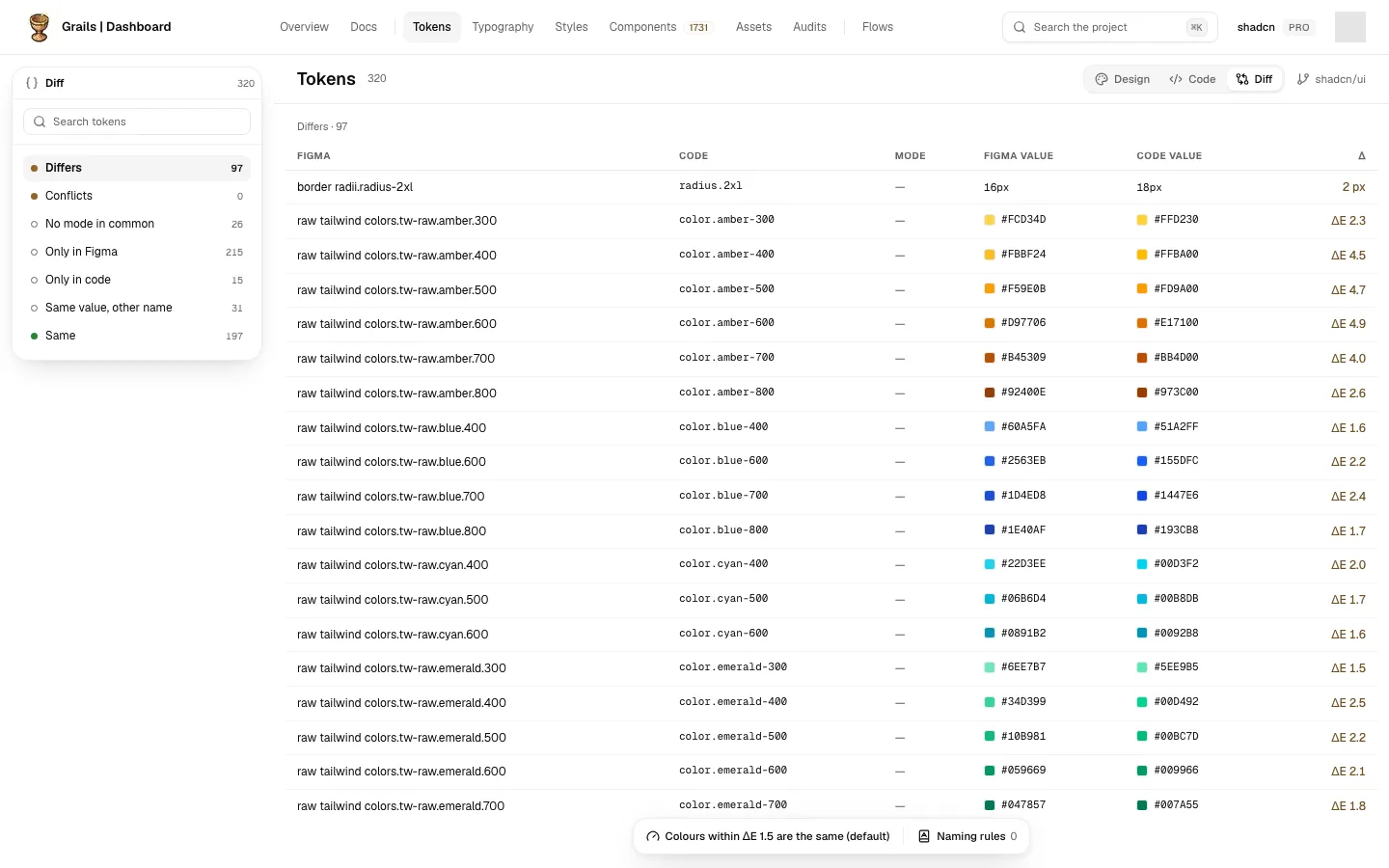
Diff
Diff is the third side of the Tokens page. It sets the repository’s last upload against the project’s Figma tokens and shows what agrees and what does not. Switch to it with Diff in the switch at the top of the table. It opens on Differs, the group that needs attention first.
What is compared
- The Figma side is every Figma file of the project, read as one design. When two files have the same token, the one synced last is compared.
- The code side is the repository’s last upload.
- Pairing is by name, and tokens are compared mode by mode.
- Colours are the same when they are closer than the project’s colour threshold. The default threshold is ΔE 1.5, unless someone changed it.
- Dimensions are the same when they differ by less than 0.01 px.
The groups
The left panel lists the groups, each with its count:
- Differs: paired, and the values differ in at least one mode. This is where the page opens.
- Conflicts: two code tokens claim the same Figma token, and they do not agree.
- No mode in common: paired by name, but no mode is shared between the two sides, so nothing can be compared.
- Only in Figma: a Figma variable with no code token.
- Only in code: a code token with no Figma variable.
- Same value, other name: the values match, but the names are different.
- Same: paired, and everything agrees.
Clicking a group filters the table to that group. The group is kept in the address, so a link opens the same group.
The table
The table shows each pair once for each mode. The Figma value sits beside the code value, followed by the difference: ΔE for colours and px for dimensions. A mode that agrees is drawn muted, next to the mode that does not.
Naming suggestions and rules
When the code calls something by another word than Figma does, for example gray where Figma says neutral, a note over the table suggests the match.
- Admins and editors can Add rule. From then on, that pair of names is matched.
- The Naming rules button in the bar at the foot lists the rules of the repository. Admins and editors can add and remove them.
The bar at the foot
- The colour threshold: the ΔE value used to decide whether two colours are the same. Admins and editors can change it; everyone else can read it.
- Naming rules: as above.
A change to a rule or the threshold refreshes the page.
When there is nothing to compare
If there are no Figma tokens to compare yet, the side says so. If the repository has not uploaded tokens, or Code Sync is not on the plan, the side explains how to turn it on in the same way as the Code side. If the comparison cannot be read, the side says it could not load it.