

Syncing tokens
A sync uploads the design tokens first, in one request, and then the components. This page is about the tokens: where the CLI reads them, how to see the exact list before you upload anything, and what leaves the repository.
Your own DTCG files (the recommended source)
If your team already produces design tokens in the DTCG format (from a Style Dictionary build, Tokens Studio’s
DTCG export, Specify or your own script), list those files in grails.code.json. sync uploads them as they are,
and Grails reads them.
{ "branch": "main", "dtcg": { "files": ["tokens/**/*.json"], "resolver": "tokens/resolver.json" }}filesare globs of.jsonfiles, relative to the repository’s root.resolveris optional: a DTCG resolver document that turns sets and modifiers into modes. Its references name the files relative to its own folder, so every file must be in that folder or below it.- With
dtcg, it is the only source. The CLI reads no token from Tailwind, CSS or TypeScript, and says so ifcssortokensare also listed.
What Grails reads.
- The format. DTCG 2025.10, validated against its schema. All 13 types are accepted.
- Collections. A token’s first path segment is its collection:
color.brand.500is incolor. - Modes. With no resolver, each collection has one mode,
default. With a resolver, a modifier’s contexts are the modes, and two or more modifiers give one mode per combination (light·brand-a). - Aliases are
{path}references. - Limits. At most 500 files and 4 MiB per upload; the CLI checks both before sending anything.
When Grails cannot read a file, the sync stops the tokens with exit code 3 and lists each problem with the file and the place in it (a JSON pointer). Fix the file and sync again. Two refusals are common:
- Tokens Studio’s older format: export as DTCG (W3C).
- A token at the root, with no collection.
What each component uses. A sync records which components each component renders, and which tokens it uses through
a var(--x) that Grails can tie to one of your tokens. The next section says how, and what
to do about the ones it cannot.
Which token a var(--x) is
Your components write var(--color-brand-500); your DTCG files say color.brand.500. Nothing in the files connects the
two, so Grails assumes the naming a stock Style Dictionary build gives (its css transform group):
- The token’s path segments are joined with
-, in lower case:color.brand.500is--color-brand-500. - The build’s
prefixgoes first: withprefix: "ds", it is--ds-color-brand-500. - camelCase is split (
fontSizebecomesfont-size), but a digit stays with its letters (2xl,body2). - Any other character is a separator, and the name is case-sensitive.
Say your build’s prefix, and list the custom properties that do not follow the naming, in grails.code.json:
{ "dtcg": { "files": ["tokens/**/*.json"], "cssVariables": { "prefix": "ds", "exceptions": { "--brand": "color.brand.500" }, "ignore": ["--radix-*", "--tw-*"] } }}All three keys are optional. An exception maps a custom property to the dotted path of a token, and it wins over the
naming. ignore is for custom properties that are not your tokens at all (a library’s, the framework’s): a list of
patterns that start with --, where * is the only wildcard (at most 200). A name a pattern covers is not resolved, not
counted and not listed, and Grails never receives it, even when your naming would have found a token of that name. An
exception wins over ignore, because it names a token on purpose. Use exceptions for what a name is and ignore for
“this one is not ours”.
To see what resolves, run grails-cli sync --dry-run. It needs no key and sends nothing:
css variables 14 used by components · 11 resolve to a DTCG token · 3 do not ! var(--legacy-gap) is no token of the DTCG files: used by src/Card.tsx#Card and 2 moreEvery var(--x) that resolves to no token is listed, with the components that use it. For each one, either add it to
exceptions (it is a token with a different name), or add a pattern to ignore (a component’s own variable, a
library’s such as --radix-*, Tailwind’s --tw-*, one the page sets at run time). Two other things are reported: a name
that two tokens share (say which one in exceptions), and an exception whose token is not in your files any more. None
of this fails a sync. When something is ignored, the line ends with how many (· 14 ignored); never which.
--json carries the same list in css_variables, plus ignored (the count) and ignore_unused: the patterns that
ignored nothing, which you can delete. A pattern that covers nothing is not an error.
Keep ignore narrow. A pattern wins over the naming, so --*-bg would hide a real token that happens to end in -bg.
Cover a family by its owner’s prefix (--radix-*), and add an exception for a name that is a token inside a broad pattern.
Where Grails looks for a var(--x)
A custom property a component can use, in three places:
- The
styleof any element, every property (margin,border,box-shadow, and the rest), also thecontentContainerStyle,cssandsxprops, a constant or style sheet the style refers to, and every branch of a condition. - The stylesheet the component’s file imports: a
.cssfile, a CSS module,.scssor.less. Every component in that file gets it, and a stylesheet two files import counts for both. A stylesheet’s own@importis not followed. A custom property that a rule declares in:root, a theme selector or@themeis a token’s definition, not a use. - Tailwind classes, in
classNameand incn,clsx,cx,classnames,twMergeandcvacalls, with their variants:bg-[var(--x)]in any version,bg-(--x)in Tailwind 4, andbg-[--x]in Tailwind 3 (Tailwind 4 does not turn that one into avar()).
It does not see a name that is put together at run time (var(--space-${n})), a class helper it does not know,
CSS-in-JS template literals, or a property set from JavaScript. A Tailwind theme class such as bg-primary and a
TypeScript token object are counted but not tied to a token.
The scanner’s sources (without dtcg)
The CLI reads four kinds of source. A library can use several at once, and each source is listed on its own.
| Source | How it is listed | What the CLI reads |
|---|---|---|
| TypeScript token objects and enums | tokens in grails.code.json | Each member of the exported object or enum. A colour, a number or a string becomes a token. |
| CSS custom properties | css in grails.code.json | The variables of each file. :root is the default mode, and .dark (or another selector) is the next mode. |
| A Tailwind 3 theme | Found by the CLI, from the project’s tailwind.config.* | The theme as Tailwind resolves it, defaults included. |
A Tailwind 4 @theme stylesheet | Found by the CLI, from the project’s CSS | The @theme values, defaults included. Its CSS variables become a collection with one mode per selector. |
The example below uses the first two: a TypeScript object and a CSS file.
{ "tokens": [{ "import": "src/tokens/color", "name": "color" }], "css": ["src/styles/theme.css"]}Tailwind
The CLI reads a Tailwind theme with the project’s own tailwindcss, the same version the project builds with.
Two things follow from that:
- Install the project’s dependencies first (
npm ci, or the project’s package manager). Without them the run stops with exit code 2. The CLI never reads the theme with a copy of its own. - Reading the configuration runs
tailwind.config.*, the same way the project’s build does.
What the CLI does not turn into a token
calc() is computed, because DTCG has no expressions. A value the CLI cannot express is left out and listed, never
guessed. tokens and tokens --json both print the values left out and the reason for each.
A tokens entry whose file is found but that gives no token says why, in the same list. The usual cause is a wrapper:
with const Typography = StyleSheet.create(typographyObject) the CLI reads an object, not a call, so the profile has to
name typographyObject, and the line says exactly that. The other causes are a name the file does not declare, and a
declaration none of whose values is a token.
Naming a collection, and taking one out
A tokens entry becomes a collection named after its exported name. When two entries export the same name (an old
Color in src/constants/Color and a new one in src/constants/v2/Color), the CLI tells them apart by their folders:
Color and v2-Color. That name belongs to the pair, not to the entry: take one entry out and the other is renamed, and
every token under it changes path in Grails.
collection fixes the name:
{ "tokens": [ { "import": "src/constants/v2/Color", "name": "Color", "collection": "v2-Color" } ]}It is 1 to 100 characters, with none of ., { or }, and not starting with $. Two entries cannot fix the same
name, and a fixed name is used as written: nothing renames it, not another entry going away and not a collision (the
entry without a fixed name is the one that is renamed). The collection of text styles an entry makes follows it
(v2-Color-typography).
You rarely write it by hand. grails-cli unsync --collection Color removes an entry from the file and from Grails, and
writes collection on every source that stays and owed its name to its folders. See
unsync.
Start your DTCG files from the scanner
If you have no DTCG files yet, the scanner can write a first version for you. Run it with a folder to write to:
grails-cli tokens baseline --out ../acme-tokensIt writes the tokens the scanner reads as DTCG files under tokens/, and a resolver.json that names the files
and the modes. They are the same files Grails writes when it exports a project’s tokens. The command sends nothing and needs
no key.
- It writes only where you say. A folder inside the git repository also needs
--in-repo, asscan --outdoes, and a folder that already has files is refused: a baseline never overwrites anything. - It prints what to do next. The files are yours now. Review them, commit them, and declare them in
dtcgas shown above. From then on you keep your own generation rules, and the scanner stops being the source. - It refuses once
dtcgis declared. Those files are the token source, and a baseline from the scanner would compete with them. - Values left out are listed in the output with the reason for each, as
tokenslists them. They are not in the files, and they are never guessed.
See what would be uploaded
tokens prints a summary of the tokens it found, grouped by source:
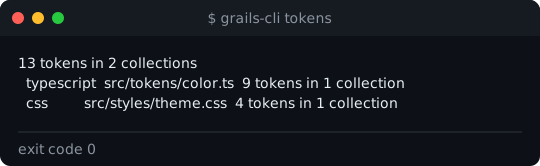
tokens --json prints the exact token list a sync uploads, plus the values left out. It sends nothing and needs no key.
Use it to check what a sync would send before you run one:
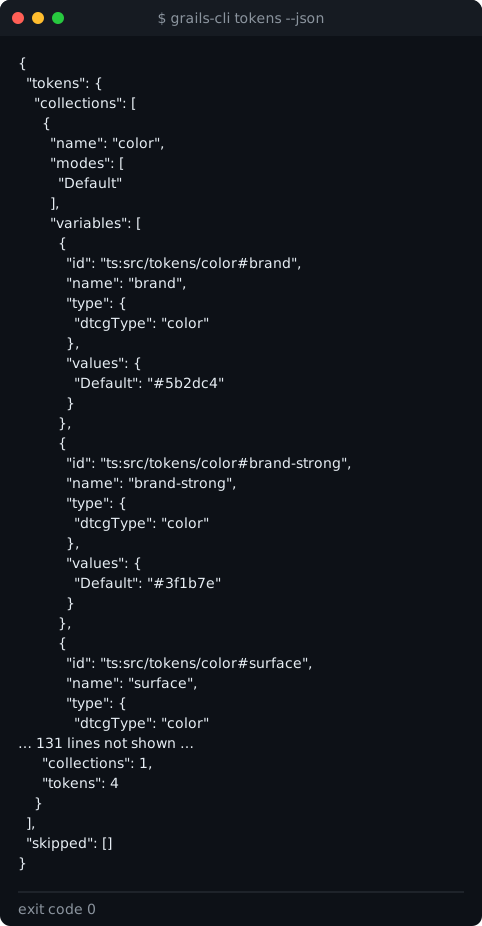
Each token has a name, a type (its DTCG type), and a value for each mode. A value is either a literal or a
reference to another token.
sync --dry-run shows the same counts in the summary, and with a key it asks Grails which tokens would be added,
changed or removed.
What leaves the repository
The CLI builds the upload field by field from an allow-list. Anything not on the list is not sent.
Sent:
- the token names, their declared type, and a literal or an alias for each mode;
- the file each token came from, relative to the root.
Never sent:
- file contents and comments;
- absolute paths, or the root of the scan;
- any environment value a Tailwind configuration reads outside its theme.
The API checks the same list again when it receives the upload, and the database checks it a last time. Run
grails-cli tokens --json at any time to see exactly what would go.
After the upload
When the tokens are recorded, the CLI asks Grails how they compare with the Figma tokens. That comparison and the naming rules it uses are on Code ↔ Figma.