

Colours and units
Each code token has a type, and each type is edited in its own way. This page covers the types whose value has a unit or a space: colours, sizes, times, numbers and the composites made of them. For the dialog itself, see Editing a value. For aliases, see Fixed values and aliases.
Colours
The colour space of a token
A colour token is written in a colour space: sRGB, Display P3, oklch, lab and so on. The editor shows the colour in that space, with that space’s channels. A token in sRGB shows its red, green and blue. A token in oklch shows L, C and H.
Grails never changes the space of a token. Every colour you type or pick is converted into it.
Typing or picking a colour
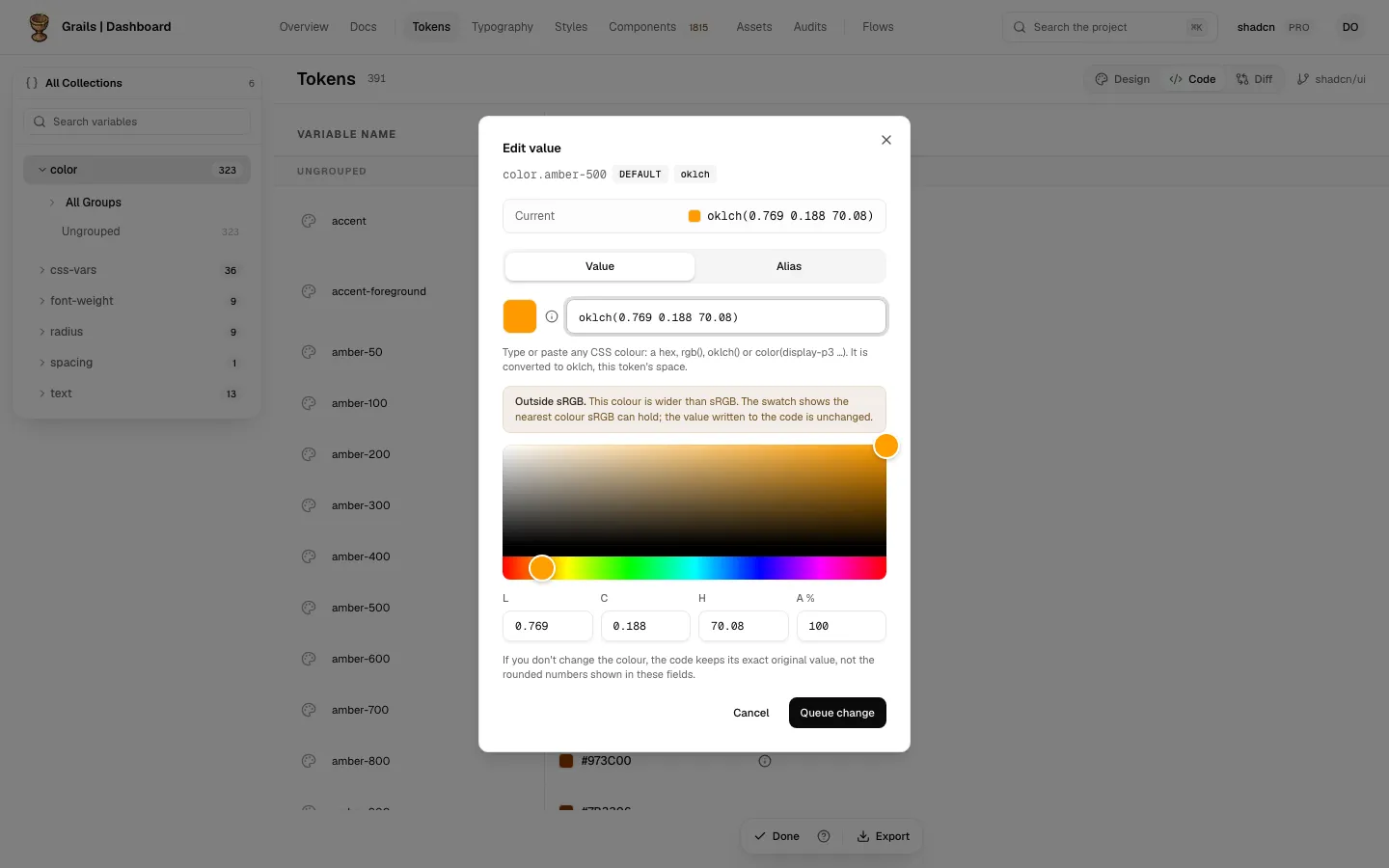
The colour field takes any CSS colour, such as a hex value, rgb(), oklch() or color(display-p3 …). The dialog says so under the field:
Type or paste any CSS colour: a hex, rgb(), oklch() or color(display-p3 …). It is converted to sRGB, this token’s space.
The name of the space in that sentence is the token’s own. The picker works the same way: the colour it gives is converted into the token’s space.
When the colour you typed was written in another format, the dialog says what happened:
Converted from hex to sRGB · inside sRGB
The note appears when the format differs from the token’s space. The second part, inside sRGB, tells you that the converted colour is within sRGB. Without it, the colour is outside sRGB (see below). A colour name, such as rebeccapurple, is reported as “Converted from a colour name to …”.
Bounded and unbounded spaces
Some colour spaces have a limit on each channel. Grails calls them bounded:
- sRGB
- linear sRGB
- Display P3
- Adobe RGB
- ProPhoto RGB
- Rec. 2020
A bounded token holds only colours its space can hold. Each channel goes from 0 to 1. If you type or pick a colour wider than the token’s space, Grails brings it to the nearest colour in that space, and the dialog says so:
This colour is wider than sRGB, this token’s space: it was adjusted to the nearest sRGB colour.
The sentence names the token’s space. If you type a channel number outside 0 to 1 in a bounded space, the change is blocked with a message such as “In sRGB each channel is from 0 to 1.”
Unbounded spaces, such as oklch and lab, have no such limit. They keep the colour as you typed it, so an oklch token can hold a colour wider than sRGB.
Outside sRGB
Some colours your screen cannot show in sRGB. When the colour of a token is outside sRGB, two things happen:
- The swatch shows the nearest colour sRGB can hold, and a mark sits beside it. The cell in the table has the same mark.
- The dialog explains it:
Outside sRGB. This colour is wider than sRGB. The swatch shows the nearest colour sRGB can hold; the value written to the code is unchanged.
The value in the code is the colour you wrote. Only the swatch is approximate.
Opacity
The A % field is the opacity, as a percentage from 0 to 100. Anything else is refused with “The opacity is a percentage from 0 to 100.” An opacity of 100 is written as an opaque colour, with no alpha.
The hex fallback
Some colour values carry a hex as a fallback next to the colour. When you change the colour, Grails recalculates that hex from the new colour. It never keeps an old hex next to a new colour.
An untouched colour
If you do not change the colour, the code keeps its exact original value. The fields show rounded numbers, and those numbers are never sent in their place. The dialog says so:
If you don’t change the colour, the code keeps its exact original value, not the rounded numbers shown in these fields.
Sizes: px and rem
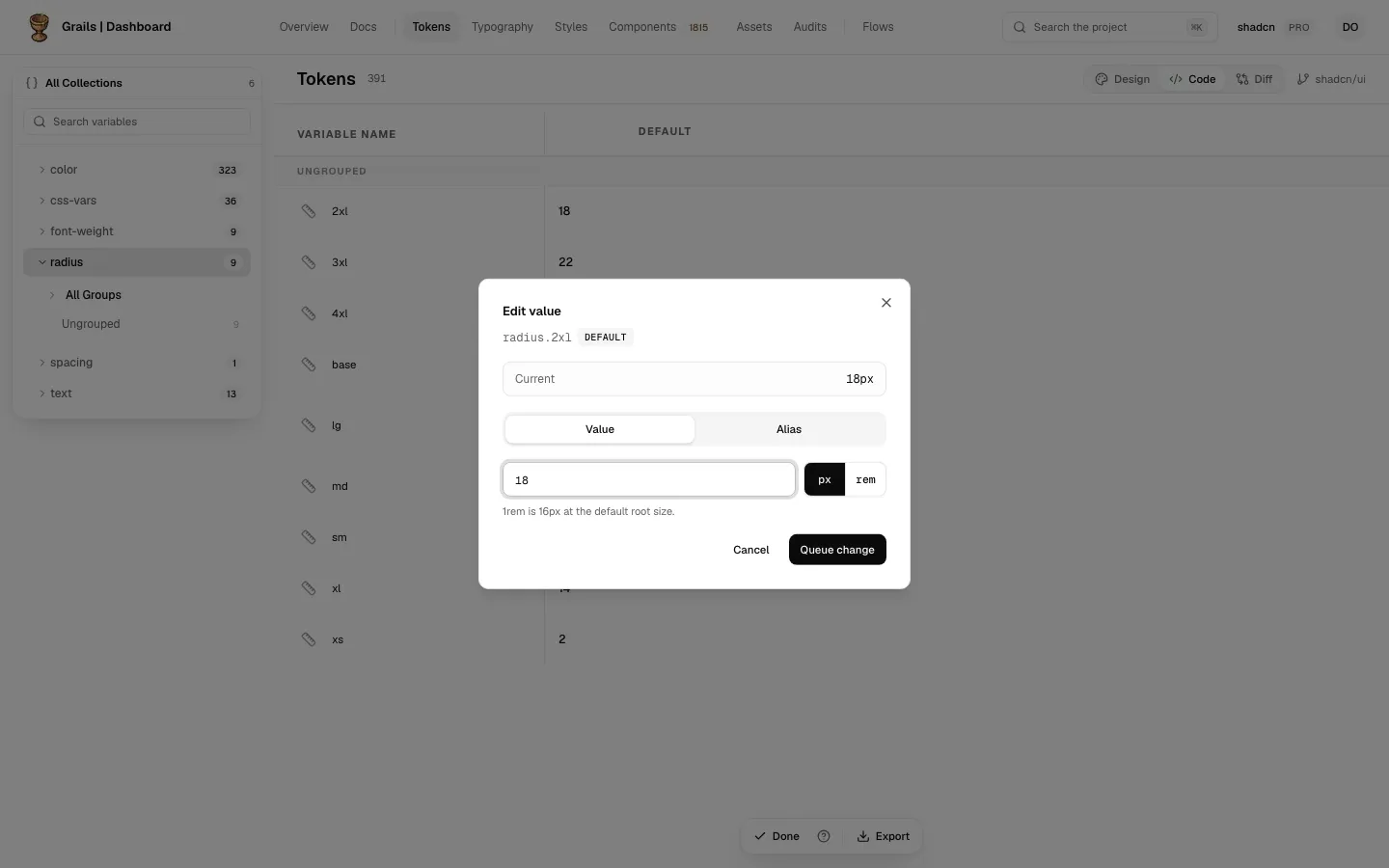
A dimension token is a number and a unit, px or rem. The dialog has a unit toggle that converts the number:
- 1rem is 16px at the default root size. The dialog says: “1rem is 16px at the default root size.”
- 24px becomes 1.5rem. 1.5rem becomes 24px.
The unit the token had is kept, unless you switch it. Switching converts the number and rounds it to four decimal places.
Times: ms and s
A duration token is a time, in ms or s. Switching the unit converts the number: 1000ms is 1s. A duration cannot be negative, and the dialog says “A duration cannot be negative.”
Numbers and font weights
Number tokens hold a plain number. A field that does not read as a number is refused with “Enter a number.”
Font weight tokens take a number from 1 to 1000, or a name such as bold. The names are the standard weight names, such as light, regular, medium, semi-bold and bold. The shortcuts set the usual weights:
| Shortcut | Weight |
|---|---|
| Light | 300 |
| Regular | 400 |
| Medium | 500 |
| Semibold | 600 |
| Bold | 700 |
A weight outside 1 to 1000 is refused with “A weight is a number from 1 to 1000.” Anything that is neither a number nor a name is refused with “Enter a weight from 1 to 1000, or a name like bold.”
A value that does not read
A value is not sent while the editor cannot read it:
- The field is marked as invalid, and the message appears under the editor. The message is one of the sentences above, such as “Enter a number.” or “Each channel takes a number.”
- Queue change is off until the message goes away.
- An empty field is not zero. It is an unread value, and the dialog asks for a number.
When you type a colour in the CSS field that Grails cannot read, the field is marked and the dialog says: “Grails cannot read that as a colour. Try a hex like #1F4BFF, or rgb(), oklch() or color(display-p3 …).”
Composites: shadow, border, gradient and transition
A composite is made of parts: a shadow’s offsets, blur and spread, a border’s width, a gradient’s stops, a transition’s duration. Each part is edited with its own unit, and each keeps it:
- A shadow can have its offsets in px and its blur in rem. Changing the blur does not change the offsets’ unit.
- A transition’s duration can be in ms while its delay is in s.
Only the parts you change are rewritten. The others keep the values they had. A part with an older spelling, such as "4px", is written in the current form once you change it.
A part that points at another token has no unit of its own. See Fixed values and aliases.
Related
- Editing a value for the dialog and the other types.
- Fixed values and aliases for a value that points at another token.
- Pending changes to see what waits and discard it.