

CLI Commands
Every command takes an optional root, the folder of the library. It defaults to the current folder. The
screenshots come from a small invented library (acme-ui), not from a real project.
Reading the code
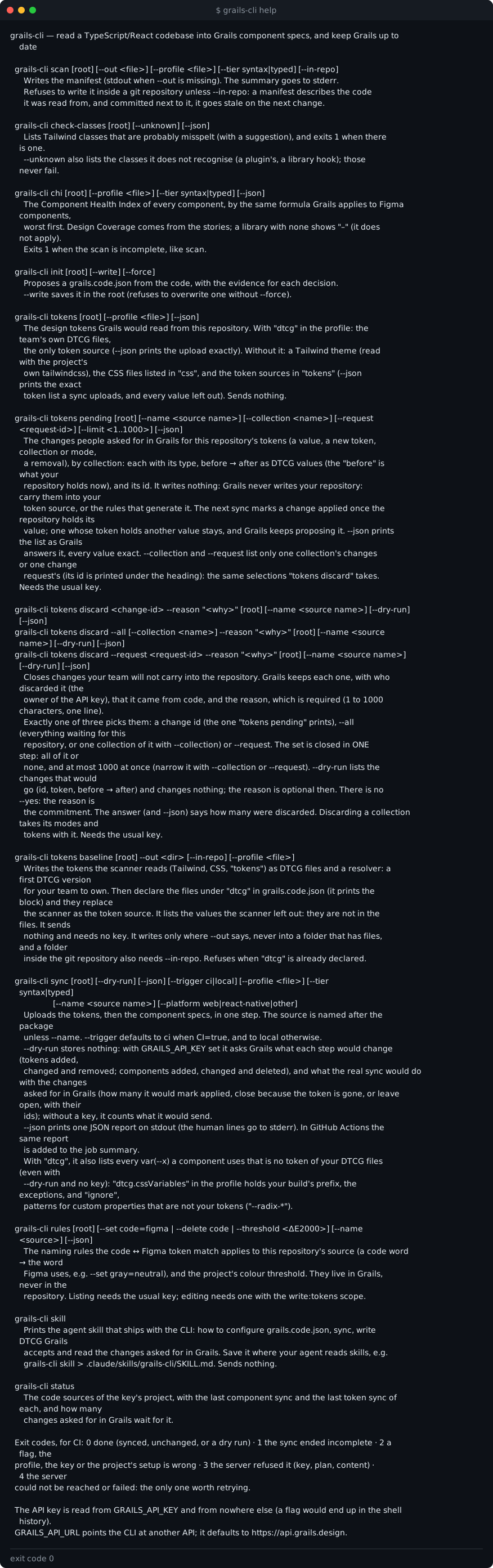
help
Prints the full reference. --help on any command does the same. There is no separate help text for each command.
init
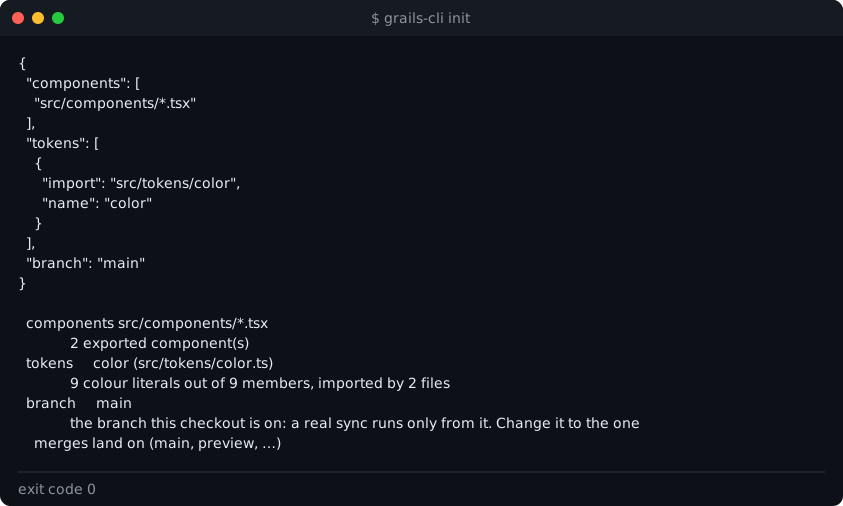
Reads the library and proposes a grails.code.json, with the evidence for each choice. It writes nothing unless
you add:
--write: save the file in the root. The CLI refuses to overwrite an existing one;--force: overwrite it.
scan
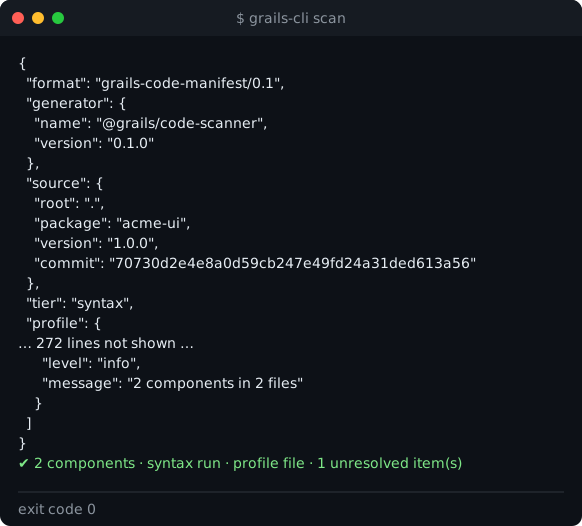
Writes the manifest: every component the code holds, with its spec, as JSON. Without --out the manifest goes
to the screen. The summary goes to stderr.
--out <file>: write the manifest to a file. The CLI refuses a path inside a git repository unless you add--in-repo, because a manifest committed next to the code goes stale on the next change.--profile <file>: use another configuration file.--tier syntax|typed:syntaxreads the files as they are written.typeduses the TypeScript checker, which needs the project’s dependencies installed.
Exits 1 when the scan could not read every component. A manifest that is missing a component must never look like one where the component was deleted.
The image shows the start and the end of the manifest. The middle is cut from the image, not from the output.
chi
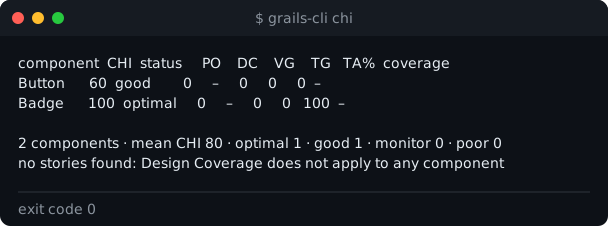
Prints the Component Health Index of every component, worst first, by the formula Grails uses for Figma components. Design coverage comes from the stories. A library with no stories shows a dash, because the measure does not apply to it.
--json: print the same as JSON.
Exits 1 when the scan is incomplete, as scan does.
check-classes
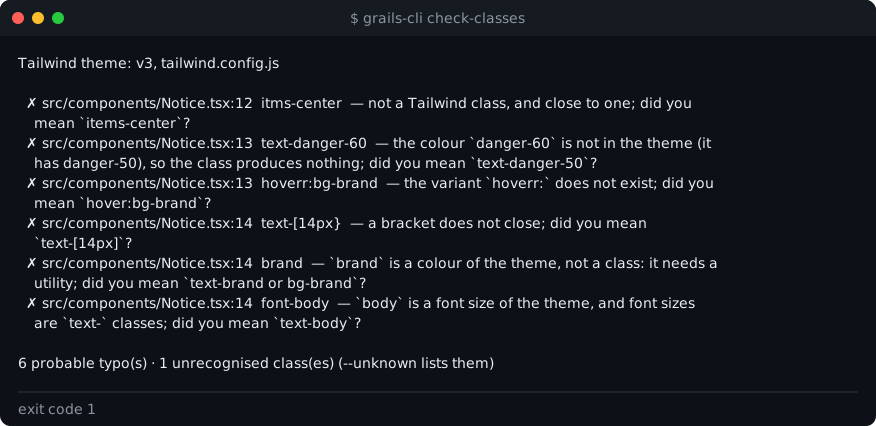
Lists Tailwind classes that are probably misspelt, with a suggestion for each one. It reads the project’s Tailwind theme, and it does not flag the project’s own CSS classes.
--unknown: also list the classes it does not recognise (a plugin’s, or one a library adds at run time). Those never make the command fail.--json: print the findings as JSON.
Exits 1 when there is at least one probable typo.
Tokens
tokens
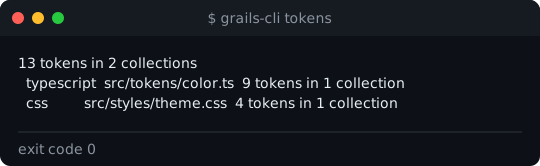
Prints the design tokens Grails would read from the repository, grouped by source, and every value it left out. It sends nothing and needs no key.
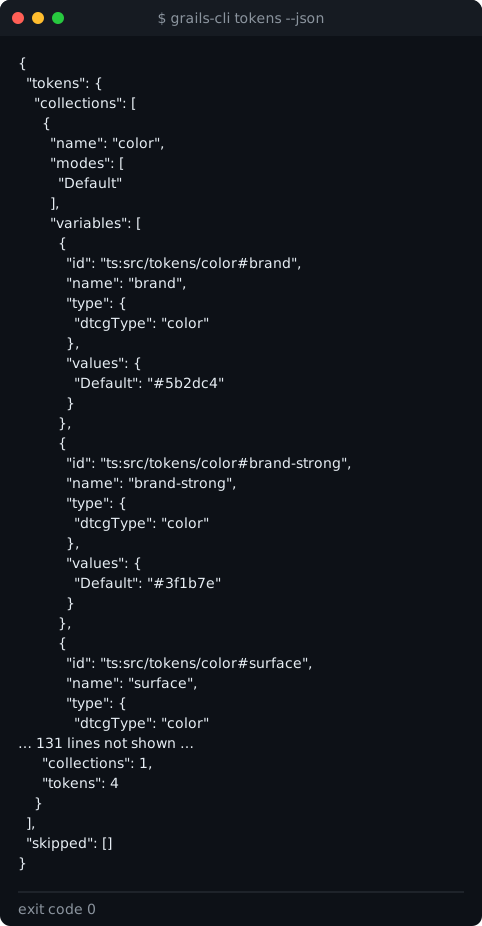
--json: print the exact token list a sync would upload, and the values left out. See Tokens.- With
dtcgingrails.code.json, it lists the DTCG files a sync would send, and--jsonprints the upload exactly.
tokens baseline
Writes the tokens the scanner reads as DTCG files and a resolver.json: a first DTCG version for your team to own.
Review the files, commit them and declare them in dtcg, and the scanner stops being the source. It sends nothing and
needs no key. See Tokens.
--out <dir>: where to write. It is required: the command writes only where you say.--in-repo: needed when the folder is inside a git repository, as inscan.--profile <file>: use another configuration file.- It refuses a folder that already has files, and it refuses to run once
dtcgis declared ingrails.code.json. - It prints the
dtcgblock to add, and the values left out, with the reason for each. They are not in the files.
tokens pending
Lists the token changes admins and editors asked for in Grails for this repository: a new value, a new token,
collection or mode, or a removal. They are grouped by collection. Each line has the token’s type, before → after in
DTCG values, and the change’s id. It writes nothing: Grails never writes your repository. Carry each change
into your token source, or into the rules that generate it.
- The “before” is the value your repository holds now, resolved: an alias in your code shows as the colour it resolves to.
--json: the list as Grails answers it, every value exact.--limit <1..1000>: how many to read (500 by default).--collection <name>: only the changes of that collection.--request <request-id>: only the changes of one change request. Its id is printed under the heading of the list. The two filters combine, and the server applies them before the page, so--limitcounts what you asked for. They select the same changestokens discard --all --collectionandtokens discard --requestwould close, so you can look before you close.--name <source>: another source of the project.- It needs the usual key.
- The next
syncmarks a change applied once your repository holds its value. A change whose token holds another value stays in the list, and Grails keeps proposing its value.
tokens discard
Closes the changes your team will not carry into the repository, one or many:
grails-cli tokens discard <change-id> --reason "Handled in the design-tokens repo"grails-cli tokens discard --all --reason "Handled in the design-tokens repo"grails-cli tokens discard --all --collection color --reason "Handled in the design-tokens repo"grails-cli tokens discard --request <request-id> --reason "Handled in the design-tokens repo"Exactly one of three picks the changes: a change id (the one tokens pending prints beside the change), --all
(everything waiting for this repository, or one collection of it with --collection) or --request. Grails keeps
each change, closed, with who discarded it (the owner of the API key), that it came from code, and your reason.
--reason "<why>": required. 1 to 1000 characters, on one line, no control characters.--reason=<why>works too.--dry-run: list the changes that would be discarded (id, token,before → after) and change nothing. The reason is optional then. There is no--yes: the reason is the commitment, so look with--dry-runfirst.- A set is closed in one step: all of it or none. At most 1000 changes at once; more is refused, nothing is
discarded, and the message says to narrow it with
--collectionor--request. --collection <name>goes with--allonly.--name <source>: the changes must belong to this source of the project (the repository’s own by default).--json: what Grails answered: how many were discarded, which ids, and for a dry run the changes themselves.- The answer says how many were discarded, and when that closed the change request, that nothing else waits.
- Discarding a collection takes its modes and tokens with it. One value of a token that Grails is creating cannot be discarded alone: discard the token.
- A change that is already applied or discarded, or that is not an open change of this project, exits 3 and says which. Nothing is retried.
- It needs the usual key.
The designer’s side of these changes is on Tokens.
Syncing
sync
Uploads the design tokens, then the component specs, in one step. Tokens go first. A failed token step does not stop the components: they sync anyway, and the run exits with the token step’s code.
The source is named after the package (name in package.json), so a laptop and CI use the same name. Use
--name for another name, and --platform web|react-native|other to override the platform the CLI detects.
Main flags:
--dry-run: store nothing. With a key (GRAILS_API_KEY, or the oneconnectkept), Grails says what each step would change (tokens added, changed and removed; components added, changed, reactivated, and the ones that would be deleted), and what the real sync would do with the changes asked for in Grails (see below). Without a key, the CLI counts locally and says what it would send. Withdtcg, it also lists everyvar(--x)a component uses that is no token of your files (leaving out thosedtcg.cssVariables.ignorecovers), with or without a key. See Tokens.--json: print one JSON report on stdout. The human lines go to stderr, so the output can be piped.--trigger ci|local:ciwhenCI=true,localotherwise. The default follows that variable.--profile <file>,--tier syntax|typed: as inscan.
A flag that takes a value and is given none (--profile at the end of the command, or before another flag, or
--profile=) is refused before anything is read: exit 2, --profile needs a value. Before, it was read as if it
were not there, and the run used the profile it detected.
A real sync needs the key and a branch in grails.code.json, and it runs only from that branch. On any other
branch it uploads nothing and exits 0. See CI and exit codes.
After the tokens are recorded, the sync compares the changes people asked for in Grails (tokens pending) with what
your repository now holds, and says how many it marked applied, how many it closed because their token is gone, and how
many still wait. A comparison that fails never fails the sync: the changes stay open and the next sync compares them
again. --json carries the numbers as tokens.synced.token_changes.
With --dry-run and the key, the sync says the same thing before it happens: how many changes it would mark applied,
how many it would close because their token is gone, and how many would stay open, with the ids of each. It uses the same
comparison the real sync applies, and writes nothing. --json carries it as tokens.preview.token_changes, and the job
summary lists it.
A real sync without a key (no GRAILS_API_KEY, and nothing from connect) stops with exit code 2:

A dry run with the key asks Grails what would change, and stores nothing:
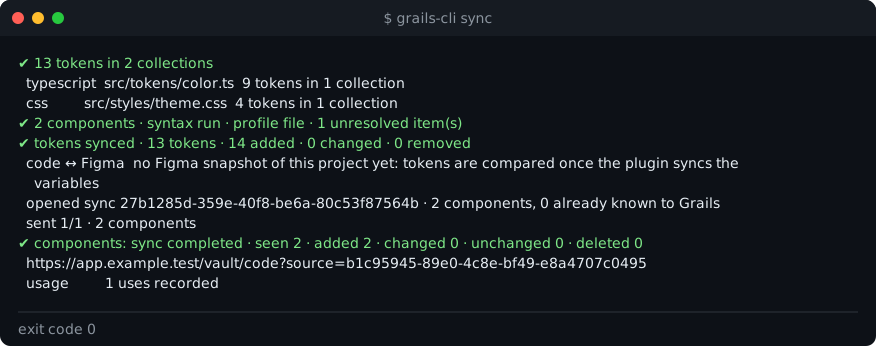
The token counts (added, changed, removed) count values, one per token and mode: a token with a light and
a dark value counts twice. That is why a sync can read “13 tokens · 14 added”.
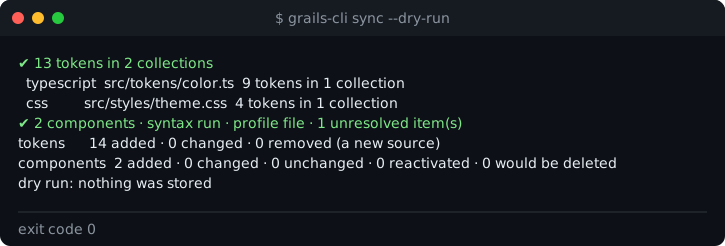
A real sync:
unsync
Takes a token collection or a component out of grails.code.json and out of Grails, in one step. It edits the
profile, so the entry is never synced again, and then runs the same sync as sync with the edited profile, which marks
what the profile no longer declares as deleted in code. Grails keeps the row, its match with Figma and its documentation,
and a later sync that has the entry again brings the same row back.
grails-cli unsync --collection Color --dry-run # what changes in the profile and in Grails; writes nothinggrails-cli unsync --collection Color # edits grails.code.json, then syncs itgrails-cli unsync --component src/ui/Legacy.tsx#LegacyExactly one of the two flags. There is no confirmation: --dry-run is the preview, like in tokens discard. It prints
what changes in the profile (entries removed and added, as JSON fragments), then what leaves Grails. With --dry-run it
writes nothing and shows the sync of the edited profile exactly as sync --dry-run would, with the key or without it.
--collection <name>: a collectiongrails-cli tokenslists. If it comes from atokensentry, that entry is removed, and the text-style collection it made (Type-typography) goes with it. Every source that stays and owes its name to its folders gets"collection"written with the name it has now: whensrc/constants/Colorgoes, the entry ofsrc/constants/v2/Colorgets"collection": "v2-Color", so it is not renamed and its tokens do not change path in Grails. The CLI then reads the tokens again with the edited profile, and refuses, writing nothing, unless the collections that remain are exactly the ones there were minus this one.--component <key-or-name>: a key (file#export) or a name; a name two components share lists their keys. Its file is added toexclude. If the file holds other components the command refuses and lists them, because excluding a file takes all of them.--profile <file>: edit another configuration file.--jsonprints one document,{ "unsync": …, "sync": … }.- It needs a
grails.code.json(a detected profile has nothing to edit:grails-cli init --writecreates one) and, for a real run, the key and abranch, checked before anything is written. The file keeps its indentation, final newline and key order; an array you kept on one line is written one item per line, and the run says so.
It refuses (exit 2, nothing written) a collection that comes from Tailwind or CSS (it names the file to edit by
hand), one that comes from dtcg (it lives in your DTCG files), and the last token the repository has, because a sync
with no tokens uploads none and Grails would keep the collection.
If the sync after the edit fails or does not complete, the file is not restored: the edit is what you asked for. The
run ends with one line, for example grails.code.json was edited (removed the token source src/constants/Color#Color; pinned the collection name "v2-Color" on src/constants/v2/Color#Color); Grails still has the collection "Color": the next grails-cli sync from main removes it, and exits with the sync’s own code. From a branch that is not the declared one it
edits the file and sends nothing: commit it and sync from the declared branch.
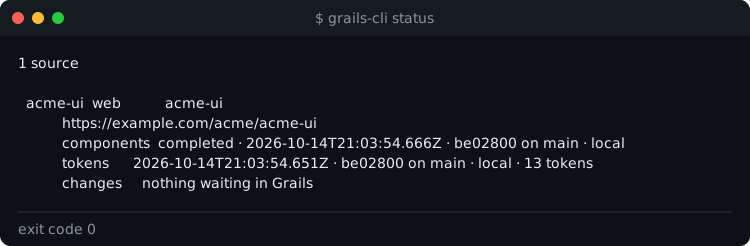
status
Lists the code sources of the key’s project, with the last component sync and the last token sync of each, and how many
changes asked for in Grails wait for it (tokens pending lists them). It needs the key.
rules
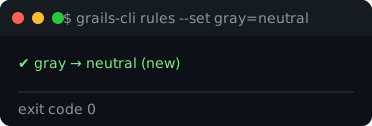
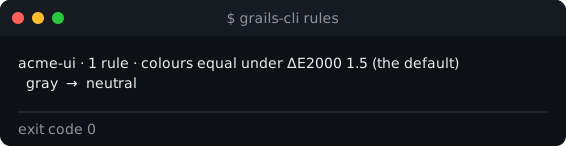
Lists, adds, moves or removes the naming rules the Code ↔ Figma comparison uses, and sets the colour threshold for the whole project. Rules live in Grails, never in the repository. See Code ↔ Figma.
rules --set gray=neutral: a word in the code is the word Figma uses. Setting the same rule twice keeps one rule. Needs thewrite:tokensscope.rules --delete gray: remove a rule. Needswrite:tokens.rules --threshold 2: the ΔE2000 under which two colours count as equal. Needswrite:tokens.- Listing needs only the usual key.
The key and the version
connect
Keeps your API key in the operating system’s keychain, so no command needs GRAILS_API_KEY in your shell. Copy the
key, then run it:
- no flag: reads the key from the clipboard;
--prompt: asks for the key in a prompt that shows nothing as you type, and does not use the clipboard. It also reads the first line of a pipe.
It checks the shape of the key (grails_sk_ and 43 characters), then asks Grails with an authenticated read, and prints
the code sources of the key’s project. Only a key Grails accepts is stored. The clipboard is cleared once it has been
read, whatever came of the key, if it still holds what was read. If the machine has no keychain, nothing is stored and
the message points to GRAILS_API_KEY. See The API key for the details.
Exits 2 for a key of the wrong shape, an empty or unreadable clipboard, or no keychain; 3 when Grails refuses the key; 4 when Grails cannot be reached. It stores nothing in any of them.
disconnect
Removes the key connect stored for the API GRAILS_API_URL points at. The key itself keeps working until you revoke it
in Team Settings › Integrations › API Keys. If GRAILS_API_KEY is set in your environment, it still wins, and the
command says so.
update
Asks the npm registry now for the latest grails-cli, ignoring the daily cache, and prints the installed version, the
latest, and the command that updates it. In a project that depends on grails-cli it is the one for the project’s
package manager (pnpm-lock.yaml means pnpm add -D grails-cli@latest, yarn.lock means yarn add -D grails-cli@latest, anything else npm i -D grails-cli@latest). Otherwise it is the one for the way this copy was
installed: npm i -g grails-cli@latest for a global install (pnpm add -g grails-cli@latest or yarn global add grails-cli@latest for those managers), and npx grails-cli@latest only when npx ran it, because npx runs the latest
without installing it and leaves a global copy as old as it was. It does not run the command.
Exits 0 whether you are behind or up to date, and 4 when the registry cannot be reached.
Your coding agent
skill
Prints an agent skill that explains the CLI to a coding agent: how to set up grails.code.json, sync, write DTCG
that Grails accepts, and read the changes asked for in Grails. Save it where your agent reads skills, for example:
grails-cli skill > .claude/skills/grails-cli/SKILL.mdIt sends nothing and writes nothing itself.
Exit codes
Every command reports its result as an exit code. In CI, only one of them is worth retrying. The full table is on CI and exit codes.