

CLI Overview
What this is
grails-cli is the Grails command line for Code Sync. It reads a component library that lives in a
repository (TypeScript and React) and uploads two things to Grails:
- the design tokens the code defines (colours, spacing, radii and the rest, from a Tailwind theme, CSS custom properties or TypeScript token objects);
- the spec of each component: its name, its props, its anatomy and the style values it resolves to.
Once they are there, the vault shows the code next to the Figma file, and you can see where the two agree and where they do not. The CLI never reads Figma and never writes anything into your repository.
Install
grails-cli is on npm and needs Node 20 or newer. In your component library’s repository:
npm i -D grails-clinpx grails-cli helpYou can also run any command without installing it: npx grails-cli <command>. The examples in these pages write
grails-cli; run them as npx grails-cli …, or from a package.json script, where the installed command is on the path.
The package is free to install and use to work with Grails. It is not open source: its license (LICENSE.md in the
package) grants no other right.
If your library uses Tailwind, install that project’s own dependencies first (npm ci, or the package manager
the project uses). The CLI reads the Tailwind theme with the project’s own tailwindcss, and without it the run
stops with exit code 2. See Tokens.
The API key
sync, status, rules, tokens pending, tokens discard and a sync --dry-run that asks Grails need an API key. Everything else works without
one: help, scan, chi, check-classes, init, tokens, and a sync --dry-run without a key (it counts
what it would send, locally).
Create the key in Team Settings › Integrations › API Keys, with the write:code scope. Editing naming
rules also needs write:tokens (see Code ↔ Figma).
The key is a personal key. If its owner is changed to viewer or leaves the team, Grails deletes the key, and the CLI reports that the key is no longer valid.
The CLI reads the key from two places, in this order, and from nowhere else:
- the environment variable
GRAILS_API_KEY: this is what CI uses, and anyone who prefers it. When it is set, the CLI does not look anywhere else; - your computer’s keychain, where
grails-cli connectkeeps it.
The CLI does not accept the key as a flag or as an argument. They would end up in your shell history and in the process list, and a CI log prints the command line. If you pass a flag that looks like a credential, the CLI stops before it reads anything.
Connect once
Copy the key (Grails shows it once, when you create it), then run:
grails-cli connectconnect reads the key from the clipboard, checks it with Grails, and keeps it in the macOS Keychain, the Linux
Secret Service or the Windows Credential Manager. After that, every command finds it there, and you do not need
GRAILS_API_KEY in your shell. In detail:
- It checks the key before it keeps it. It checks the shape, then asks Grails to list your project’s code sources
(the same read
statusmakes) and prints them. A key Grails refuses is not stored. Neither is a key it could not check because Grails was unreachable. - It clears the clipboard once it has read it, whatever came of the key, because a key Grails refuses may still be
a real one for another environment. It clears the clipboard only if it still holds what it read, so something you
copied in the meantime is left alone. Clipboard managers can keep a history of what was copied, and the CLI cannot
undo that.
grails-cli connect --promptasks for the key in a prompt that shows nothing as you type, and does not use the clipboard at all. - If the machine has no keychain (a Linux box without
secret-tooland a Secret Service, for example) it stores nothing and says so. UseGRAILS_API_KEYthere. The CLI never writes the key to a file. It checks for the keychain before it reads the clipboard, so the key you copied is still there. - There is one key per API. The keychain entry is named after the host in
GRAILS_API_URL, so a staging key and a production key can coexist, and a key is never offered to an address you did not connect it to.
grails-cli disconnect removes the key from the keychain. It does not revoke it: do that in Team Settings ›
Integrations › API Keys.
export GRAILS_API_KEY=grails_sk_xxxxxxxxxxxxxxxx # the alternative, and what CI usesThe CLI never prints the key. In CI, store it as a secret (see CI and exit codes).
GRAILS_API_URL points the CLI at another API. The default is https://api.grails.design. A plain http://
address is accepted only for this machine, and the CLI never follows a redirect, so the key cannot be sent
somewhere you did not choose.
Updates
Once a day the CLI asks the npm registry whether a newer version exists. It is one plain request for the package’s
latest version: no key, no team, no project and nothing else about you goes with it, and it gives up after about a
second and a half. If you are offline the CLI says nothing. While your installed version is behind, every run
ends with one line on stderr that names both versions and the command to update. It appears in CI too, where a pinned
version is easy to forget. Set GRAILS_CLI_NO_UPDATE_CHECK=1 to turn it off.
grails-cli update asks right now and prints the command that updates it. In a project that depends on grails-cli it is
the command for your package manager, read from the lockfile in the root: pnpm add -D grails-cli@latest,
yarn add -D grails-cli@latest or npm i -D grails-cli@latest. Otherwise it is the one for the way this copy was
installed: npm i -g grails-cli@latest for a global install (pnpm add -g or yarn global add for those managers), and
npx grails-cli@latest only when npx ran it. It does not run the command: the CLI never changes your repository on its
own.
The configuration file: grails.code.json
Put a file named grails.code.json at the root of the library. It tells the CLI where the components and the
tokens are. Every field is optional, but a real sync needs branch.
{ "components": ["src/components/*.tsx"], "exclude": ["src/components/internal/**"], "tokens": [{ "import": "src/tokens/color", "name": "color" }], "css": ["src/styles/theme.css"], "branch": "main"}| Field | What it says |
|---|---|
components | The files that define components, as globs from the root. |
exclude | Globs left out even when components matches them. |
tokens | TypeScript token objects or enums: the file (import, a path without the extension) and the exported name, and optionally collection, a fixed name for the collection it becomes in Grails. See Tokens. |
css | CSS files whose custom properties are design tokens. :root is the default mode and .dark the dark one. |
text | Components that pick their text style from props, for example Text with type and level. |
branch | The branch whose code is the library in Grails (main, preview, …). |
dtcg | Your own DTCG token files (files, globs), an optional resolver, and optional cssVariables (your build’s prefix, the exceptions to its naming, and ignore patterns for custom properties that are not your tokens, so a var(--x) can be tied to a token). When set, the files are the only token source: tokens and css are not read. See Tokens. |
branch matters: a real sync uploads only from the branch it names. From any other branch the CLI uploads
nothing, so a pull request’s CI cannot replace what the team sees. A real sync with no branch is refused until
the team declares one.
grails-cli init proposes this file from the code, with the evidence for each choice. It writes nothing unless
you add --write. To take a token collection or a component out of this file and out of Grails in one step, use
grails-cli unsync (see CLI Commands).
Your first run
-
Let the CLI read the library and propose a configuration:
Terminal window grails-cli init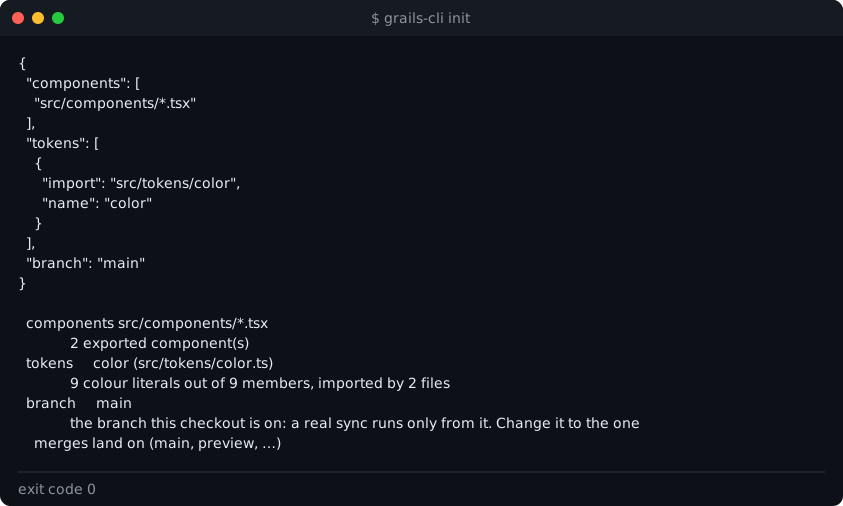
-
Save it, then check what Grails would read. This sends nothing:
Terminal window grails-cli init --writegrails-cli tokens -
See what a sync would change, without storing anything. With no key set, the CLI counts what it would send:
Terminal window grails-cli sync --dry-run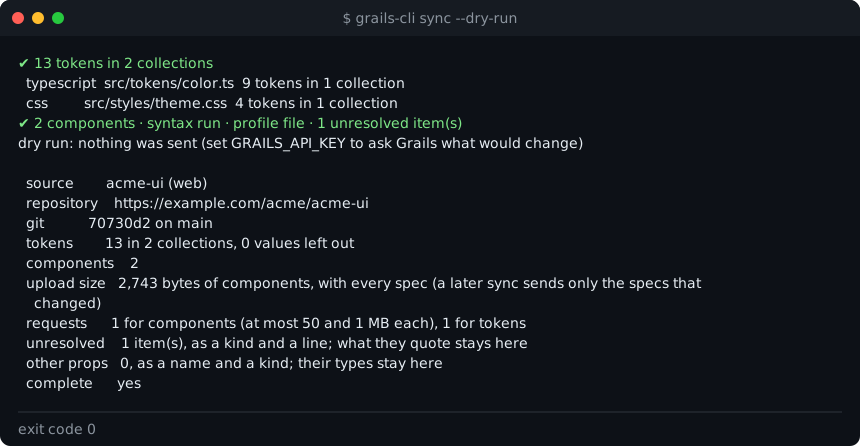
-
Connect the key (or set
GRAILS_API_KEY) and run the real sync:Terminal window grails-cli connectgrails-cli sync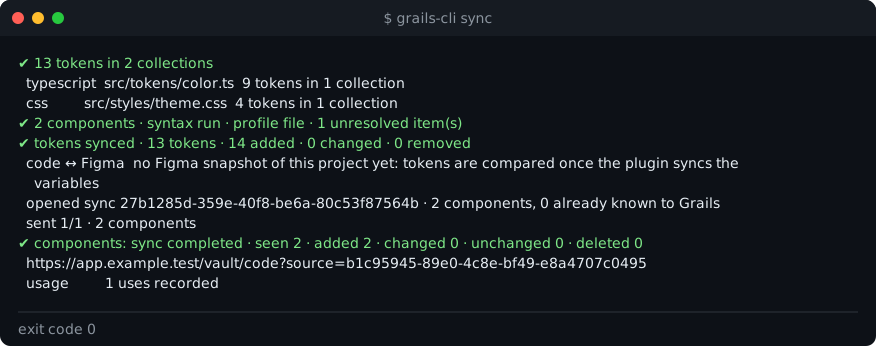
The Commands page lists every command and its flags.